Chapter 7 Noise Settings (Noise Tab)
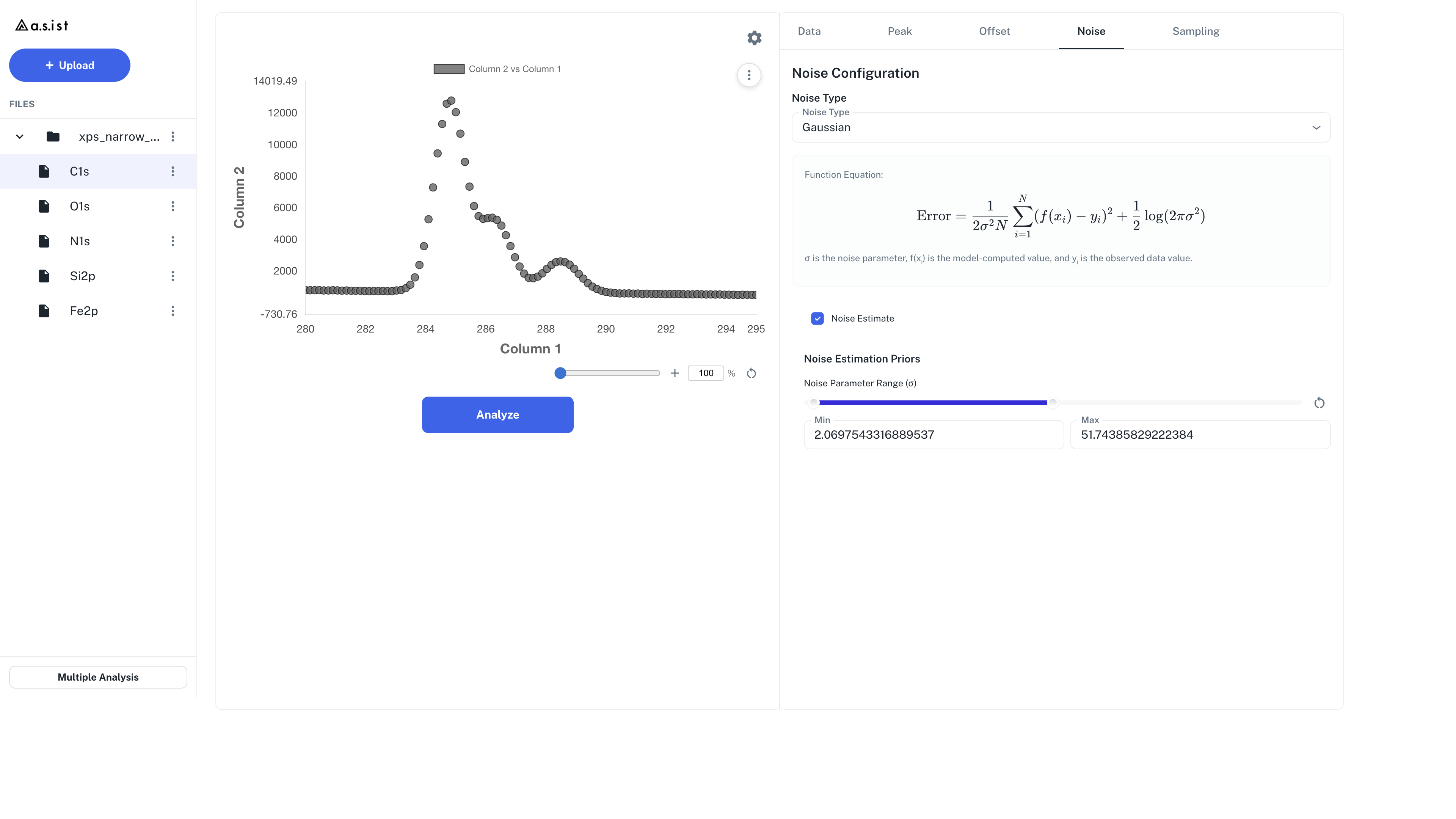
In the Noise tab, you specify the model for the noise contained in the observed spectrum.
7.1 Noise model
In the Noise model section, you can select Gaussian, Modified Gaussian, or Poisson.
| Model | Description |
|---|---|
| Gaussian | Treats the noise width with a single \(\sigma\) |
| Modified Gaussian | Treats signal-intensity-dependent noise with three parameters: \(\sigma_0\) / \(\sigma_1\) / \(\sigma_2\) |
| Poisson | Treats fluctuations in count data with a Poisson likelihood. A fixed \(\lambda\) is specified in the Noise tab |
Gaussian Equation
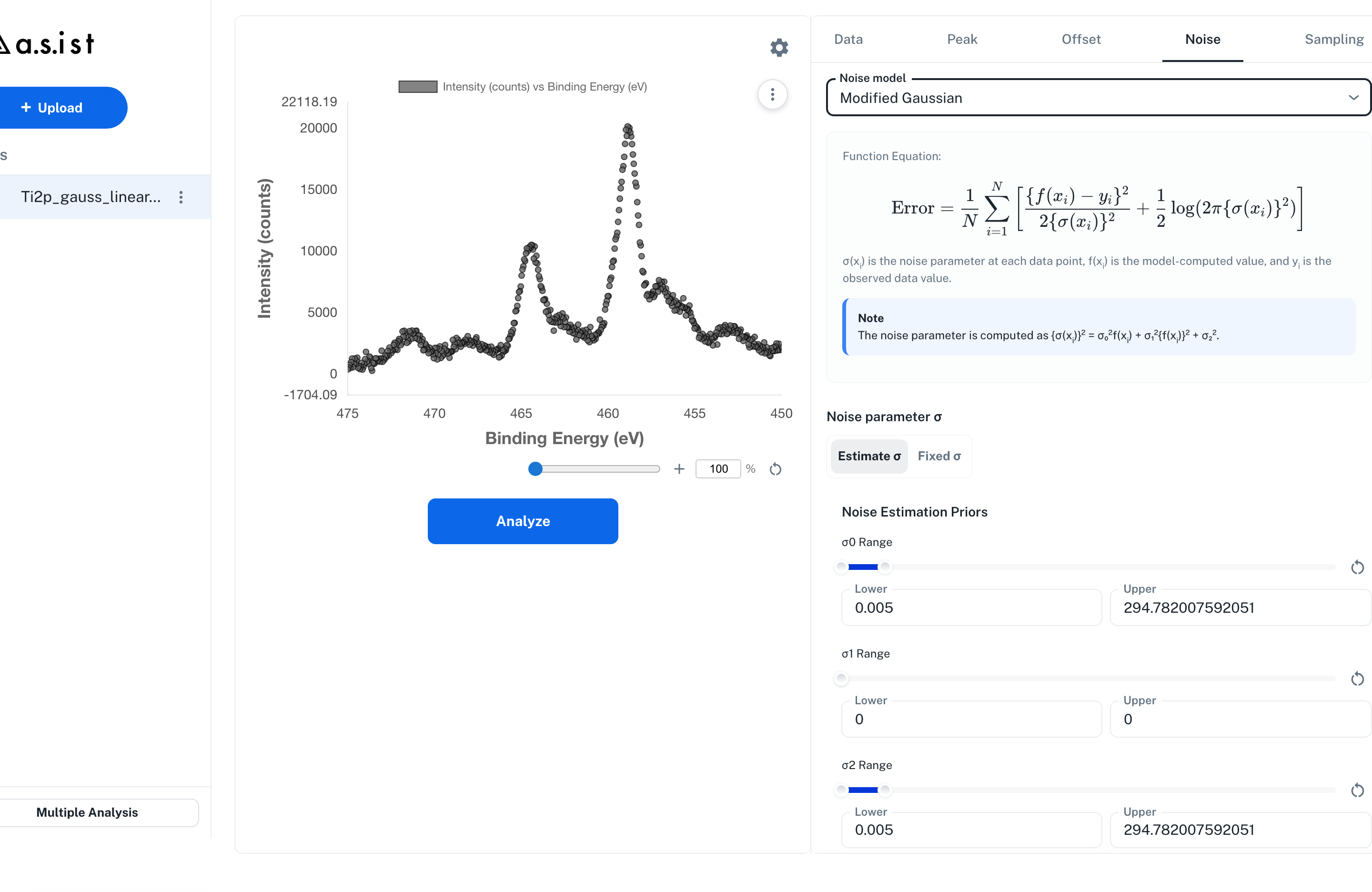
Each observation \(y_i\) is assumed to follow a normal distribution with the model prediction \(f(x_i)\) as its mean and a common variance \(\sigma^2\):
The Gaussian here is the likelihood model for the observation noise; it is distinct from the Gaussian peak shape in Chapter 5.
Poisson Equation
- \(f(x_i)\) is the model prediction (fitted curve) and \(y_i\) is the observed value
- For Poisson, the Estimate / Fixed toggle of
Noise parameter σis disabled, and a fixedNoise Parameter (λ)is entered - The initial value of \(\lambda\) is 1
Modified Gaussian Equation
Modified Gaussian uses \(\sigma_0\) / \(\sigma_1\) / \(\sigma_2\) to represent intensity-dependent and constant noise components.
- \(\sigma_0\): noise that grows in proportion to the signal intensity \(f(x)\)
- \(\sigma_1\): noise that grows in proportion to \(\{f(x)\}^2\)
- \(\sigma_2\): constant noise independent of the signal intensity
- \(\sigma(x_i)\) is the noise parameter at each data point
- \(f(x_i)\) is the model prediction (fitted curve) and \(y_i\) is the observed value
7.2 Noise parameter \(\sigma\) (Estimation Mode)
The Noise parameter σ segmented control selects how the noise parameter \(\sigma\) is handled.
When Poisson is selected, this segmented control is disabled and a fixed \(\lambda\) is entered.
| Mode | Behavior |
|---|---|
| Estimate | The noise parameter is included in the Bayesian estimation |
| Fixed | The noise parameter is given as a fixed value and not estimated |
7.3 Prior Settings
In the Noise Estimation Priors section, set the lower-to-upper range for each \(\sigma\) parameter.
Gaussian
For Gaussian, set a single \(\sigma\).
- Specify the range with the slider or numeric input
- Initial values are set automatically from the current data.
- In Fixed mode, the value is treated as a fixed value
Modified Gaussian
For Modified Gaussian, set the following three parameters.
| Parameter | Role |
|---|---|
| \(\sigma_0\) | Noise that grows in proportion to the signal intensity \(f(x)\) |
| \(\sigma_1\) | Noise that grows in proportion to \(\{f(x)\}^2\) |
| \(\sigma_2\) | Constant noise independent of the signal intensity |
- Specify the ranges with the sliders or numeric inputs
- The slider ranges are computed automatically from the Y-value scale of the loaded data
- Reloading the data recomputes the slider ranges
Poisson
For Poisson, set a single \(\lambda\).
- \(\lambda\) is treated as a fixed value and cannot be switched to an estimation target in the Noise tab
- The initial value is 1, and clicking the reset icon restores it to 1
When to Use Fixed \(\sigma\) Mode
- When the noise standard deviation is known
- When you want faster convergence of the analysis (fewer parameters)
7.4 Reset Icon
Clicking the reset icon at the top right of a slider restores each \(\sigma\) prior range to initial values recomputed from the current data.